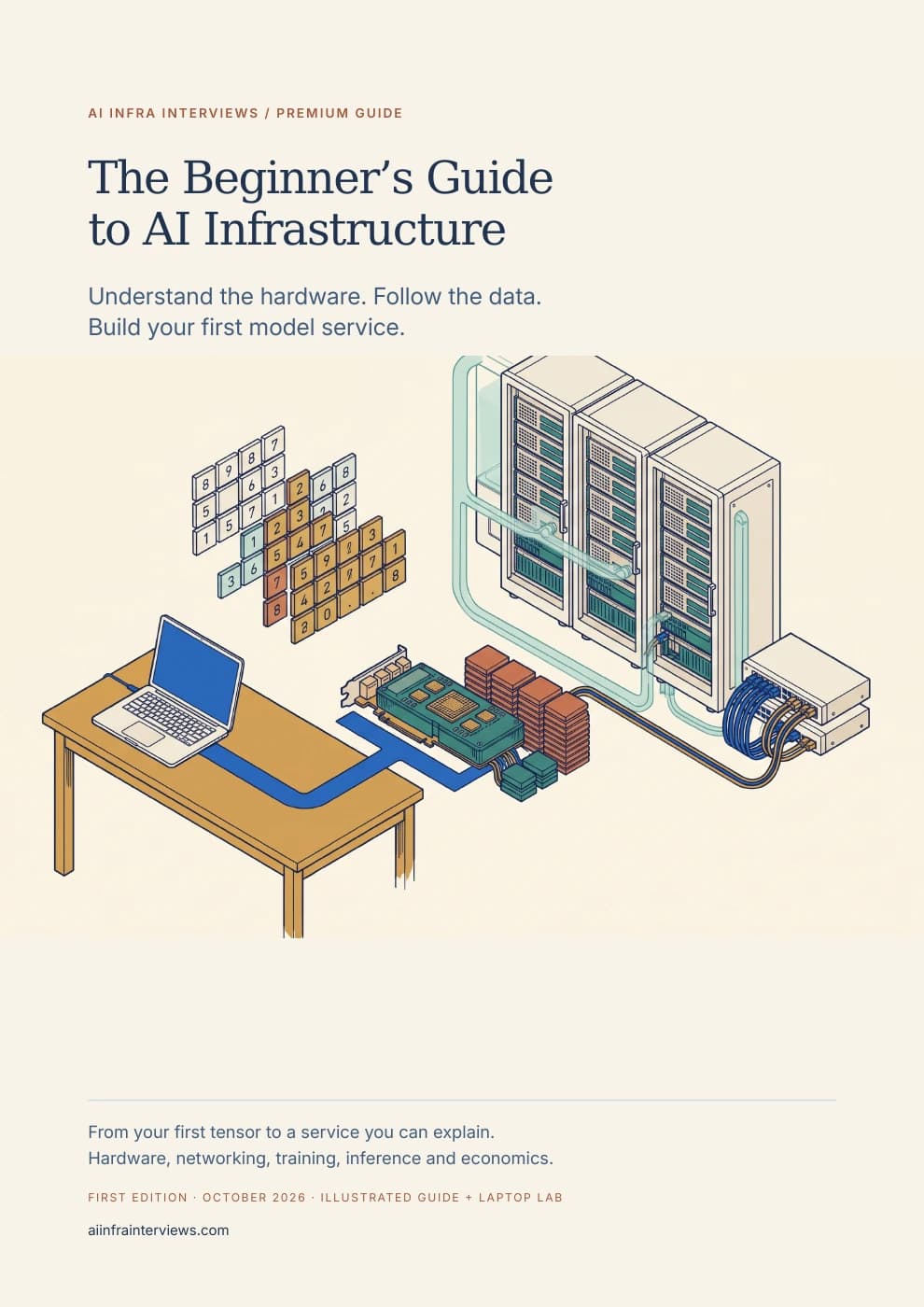
Understand the hardware. Follow the data. Build your first model service.
You have used an AI model. Now learn what it takes to run one. Start with a single question, follow it through the machine and build up to the networks, software and operating decisions behind a reliable service. Every new term has a job in the system you are learning to explain.
Premium guide PDFs and companion files require an active paid Premium membership or approved complimentary access. Referral Premium includes the rest of the site, but excludes these downloads. Keep the copies you download.
AI infrastructure is the compute, memory, networking, storage and software used to train and run machine-learning models. It also includes the systems that schedule work, protect data, observe failures and control cost. A GPU is one component. A useful service needs a complete path from an authorized request to an acceptable result.
Training changes a model's parameters using examples and a learning objective. Inference uses an existing model to produce an output. The distinction changes the memory, scheduling and recovery requirements. This guide follows both paths, beginning with arithmetic you can check by hand.
A starting point that does not assume the vocabulary
This book is for students, software engineers moving into AI, infrastructure engineers encountering models for the first time, and technical readers who want to understand what a GPU platform actually does. You do not need CUDA, Kubernetes or prior linear algebra to begin. Basic familiarity with files and a terminal helps with the included exercises.
A small document assistant connects the chapters. You first trace its request, then estimate its memory, identify its network paths, select a runtime and decide how to measure it. Training chapters explain what would change if the same team needed to adapt a model. The scenario is constructed for teaching; it is not a claimed customer deployment.
Already comfortable with these foundations? The AI Infrastructure Field Guide moves more quickly toward deeper mechanisms. This beginner's book gives you a slower, connected route to your first defensible service design.
What you will learn to do
Explain what happens after a prompt
Follow a document question through authorization, retrieval, tokenization and generation. Distinguish model weights from request state, and see where the application makes decisions the model cannot safely make for it.
Calculate whether a model might fit
Convert parameter counts into bytes, budget a conventional KV cache and account for concurrency and working space. Keep GB, GiB, advertised capacity and measured allocation separate.
Recognize the physical connections
Identify GPU memory, host memory, PCIe, NICs, management ports and common cable families. Learn what NVLink, NVSwitch, InfiniBand, RoCE, VLANs and firewalls do along the request path.
Understand how training changes a model
Work through a complete gradient update, then connect it to batches, optimizer state, checkpoints and distributed collectives. Decide whether a task calls for prompting, retrieval or fine-tuning.
Plan and measure a first model service
Start with a small compatible model, keep the endpoint private and record the environment. Define first-token latency, token delivery, acceptable-task goodput and the failures a benchmark must retain.
Make an operating and cost decision
Choose useful dashboard signals, set release and rollback conditions, and calculate cost over the full billed interval. Finish with an evidence pack another engineer can inspect.
See the hardware, cables and boundaries
The illustrations show an accelerator package, a server cutaway, a rear panel, connector families, a leaf-spine network and the placement of application and management boundaries. Colors distinguish memory, compute and traffic paths. Each technical drawing is an original schematic with labels and a caption explaining its limits.
You will learn why a QSFP-shaped port does not establish the supported speed, why an NVLink connection differs from a network interface, and why a VLAN is not a firewall policy. The chapter gives you a method for checking the exact port, cable, optics, peer and equipment documentation before connecting a system.
Inspect the actual PDF layout before choosing the guide. These selected pages introduce the request path, a worked memory budget and server connections. The expandable text provides an accessible version of each opening explanation.
Page 5Follow one model requestOpen the full-size page ↗Page 15Build a memory budget with unitsOpen the full-size page ↗Page 19Recognize server ports and connectorsOpen the full-size page ↗
Page 5: Follow one model request · opening text
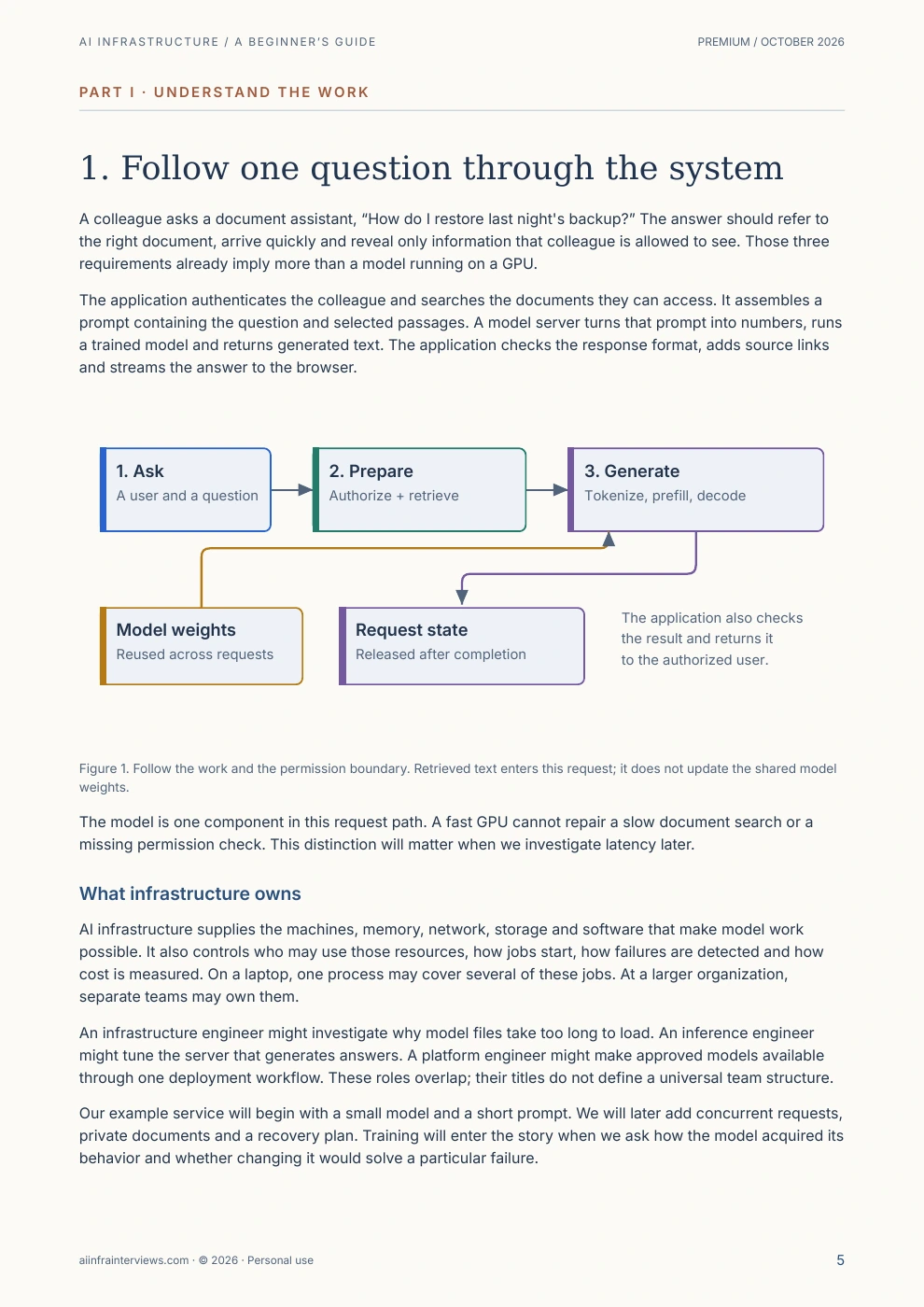
1. Follow one question through the system
A colleague asks a document assistant, “How do I restore last night's backup?” The answer should refer to the right document, arrive quickly and reveal only information that colleague is allowed to see. Those three requirements already imply more than a model running on a GPU.
The application authenticates the colleague and searches the documents they can access. It assembles a prompt containing the question and selected passages. A model server turns that prompt into numbers, runs a trained model and returns generated text. The application checks the response format, adds source links and streams the answer to the browser.
Figure 1. Follow the work and the permission boundary. Retrieved text enters this request; it does not update the shared model weights.
The model is one component in this request path. A fast GPU cannot repair a slow document search or a missing permission check. This distinction will matter when we investigate latency later.
What infrastructure owns
AI infrastructure supplies the machines, memory, network, storage and software that make model work possible. It also controls who may use those resources, how jobs start, how failures are detected and how cost is measured. On a laptop, one process may cover several of these jobs. At a larger organization, separate teams may own them.
An infrastructure engineer might investigate why model files take too long to load. An inference engineer might tune the server that generates answers. A platform engineer might make approved models available through one deployment workflow. These roles overlap; their titles do not define a universal team structure.
Our example service will begin with a small model and a short prompt. We will later add concurrent requests, private documents and a recovery plan. Training will enter the story when we ask how the model acquired its behavior and whether changing it would solve a particular failure.
Page 15: Build a memory budget with units · opening text
8. Build a memory budget you can explain
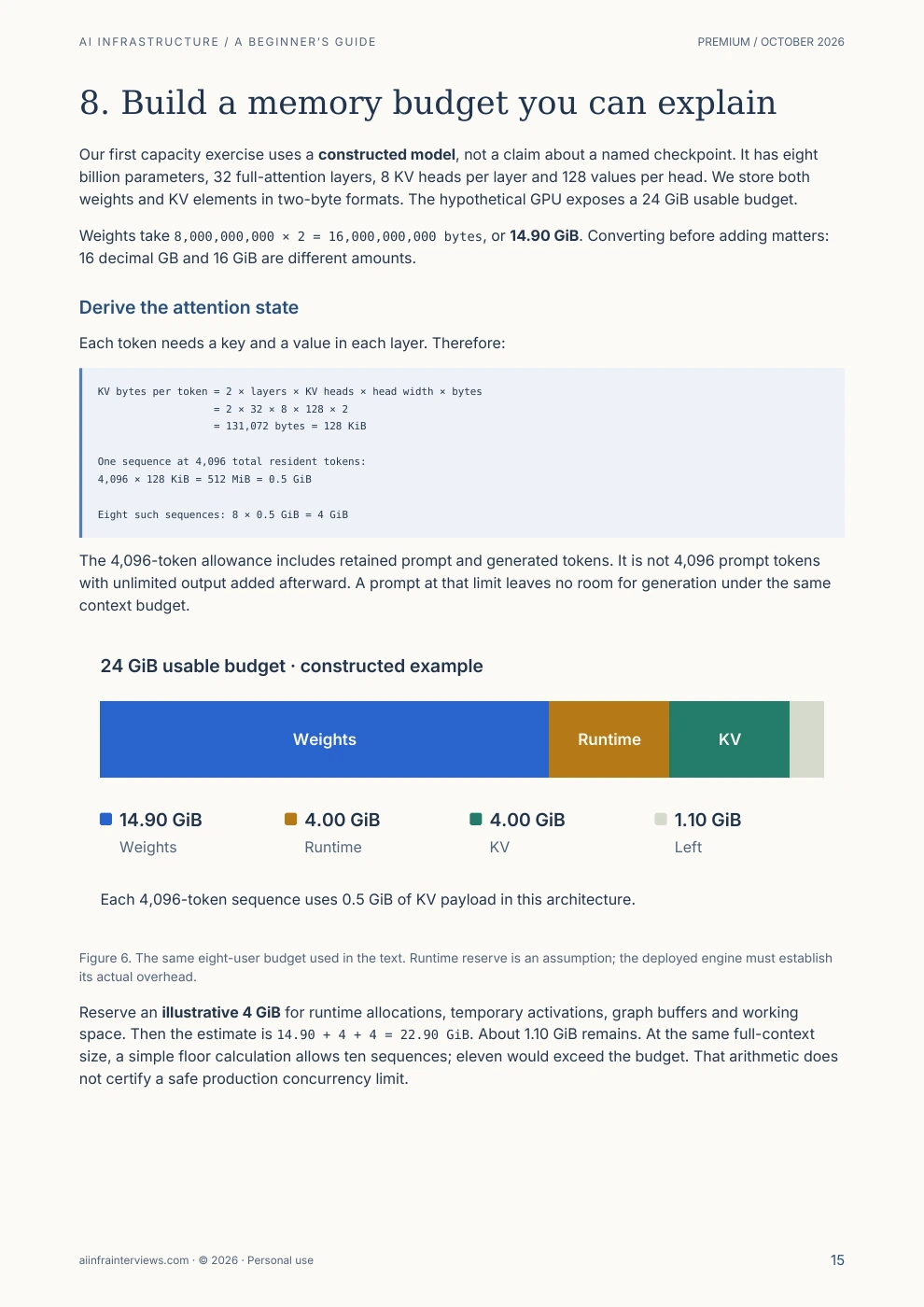
Our first capacity exercise uses a constructed model, not a claim about a named checkpoint. It has eight billion parameters, 32 full-attention layers, 8 KV heads per layer and 128 values per head. We store both weights and KV elements in two-byte formats. The hypothetical GPU exposes a 24 GiB usable budget.
Weights take 8,000,000,000 × 2 = 16,000,000,000 bytes, or 14.90 GiB. Converting before adding matters: 16 decimal GB and 16 GiB are different amounts.
Derive the attention state
Each token needs a key and a value in each layer. Therefore:
KV bytes per token = 2 × layers × KV heads × head width × bytes
                   = 2 × 32 × 8 × 128 × 2
                   = 131,072 bytes = 128 KiB

One sequence at 4,096 total resident tokens:
4,096 × 128 KiB = 512 MiB = 0.5 GiB

Eight such sequences: 8 × 0.5 GiB = 4 GiB
The 4,096-token allowance includes retained prompt and generated tokens. It is not 4,096 prompt tokens with unlimited output added afterward. A prompt at that limit leaves no room for generation under the same context budget.
Figure 6. The same eight-user budget used in the text. Runtime reserve is an assumption; the deployed engine must establish its actual overhead.
Reserve an illustrative 4 GiB for runtime allocations, temporary activations, graph buffers and working space. Then the estimate is 14.90 + 4 + 4 = 22.90 GiB. About 1.10 GiB remains. At the same full-context size, a simple floor calculation allows ten sequences; eleven would exceed the budget. That arithmetic does not certify a safe production concurrency limit.
Page 19: Recognize server ports and connectors · opening text
10. Recognize the port, then choose the cable
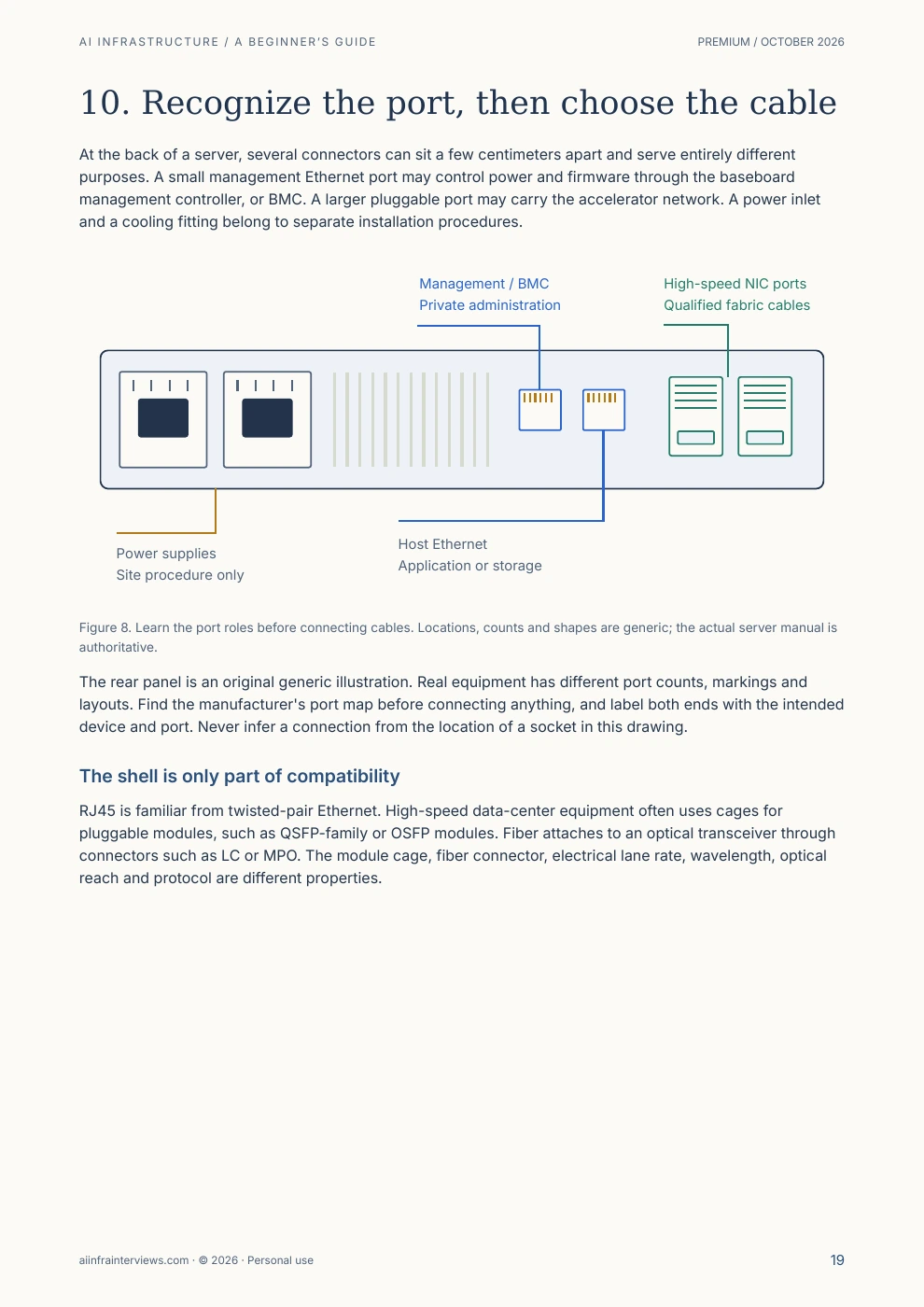
At the back of a server, several connectors can sit a few centimeters apart and serve entirely different purposes. A small management Ethernet port may control power and firmware through the baseboard management controller, or BMC. A larger pluggable port may carry the accelerator network. A power inlet and a cooling fitting belong to separate installation procedures.
Figure 8. Learn the port roles before connecting cables. Locations, counts and shapes are generic; the actual server manual is authoritative.
The rear panel is an original generic illustration. Real equipment has different port counts, markings and layouts. Find the manufacturer's port map before connecting anything, and label both ends with the intended device and port. Never infer a connection from the location of a socket in this drawing.
The shell is only part of compatibility
RJ45 is familiar from twisted-pair Ethernet. High-speed data-center equipment often uses cages for pluggable modules, such as QSFP-family or OSFP modules. Fiber attaches to an optical transceiver through connectors such as LC or MPO. The module cage, fiber connector, electrical lane rate, wavelength, optical reach and protocol are different properties.
Figure 9. Recognition drawings, not dimensioned parts. A matching shape does not establish protocol, optical or electrical compatibility.
An OSFP-shaped module is not automatically compatible with every OSFP port. Some platforms require particular thermal housings, lane mappings or breakout arrangements. “400G” describes a rate class, not an orderable cable. The LinkX product overview documents these platform distinctions.
Connection choice
What is in your hand
When to investigate it
Passive DAC
Copper cable with fixed electrical ends
A short supported connection, often within a rack.
Active electrical cable
Copper cable with signal-conditioning electronics
A supported reach beyond a passive cable's limit.
AOC
Fiber and optical ends supplied as one assembly
A fixed-length optical link where its ends and route fit.
Pluggable optics and separate fiber
Two modules plus the specified fiber path
Structured cabling, longer reach or replaceable optical components.
The NVIDIA interconnect catalog lists reach by product class. Use the exact part's limit, not a universal distance attached to the word “copper” or “fiber.” Multimode and single-mode fiber, connector polish and polarity must match the optical design.
The complete learning journey
Read the opening chapters in order, then follow the route that matches your goal. The PDF has linked contents, reading routes, worked examples, self-checks, a glossary, a formula reference and primary sources. The page numbers below are taken from the built edition.
Part I · Understand the work
Follow one question through the system · page 5
Match the infrastructure to the task · page 6
Parameters, tensors and one forward pass · page 7
From text to the next token · page 9
Read a model card before choosing a GPU · page 10
Part II · Meet the machine
What is inside a GPU? · page 12
Read a hardware specification without being misled · page 13
Build a memory budget you can explain · page 15
Part III · Connect the system
Open the server before drawing the cluster · page 17
Recognize the port, then choose the cable · page 19
Separate user traffic, administration and GPU communication · page 21
Keep data and model files moving · page 23
Part IV · Run and measure a model
Understand prefill, decode and the waiting before both · page 25
Serve several people without losing the latency target · page 26
Choose the runtime and understand its responsibilities · page 27
Make your first experiment small and reversible · page 29
Measure useful work, including the failures · page 30
Part V · Understand optimization and learning
Change one cost, then check what it moved · page 32
Prepare data that can teach and evaluate a model · page 33
Work through one training update · page 35
Decide whether the model needs more training · page 36
Split training work and account for the communication · page 38
Part VI · Operate the service
Make the software layers agree · page 40
Build a dashboard that leads to an action · page 41
Secure and release the complete application · page 43
Calculate cost per useful result · page 45
Part VII · Put the pieces together
Design a first service you can hand to another engineer · page 47
Build depth without chasing every release · page 48
A laptop lab before your first GPU bill
The companion uses Python's standard library and runs without a GPU, model download or API key. It includes a small matrix multiplication, a gradient update checked by finite differences, a memory worksheet, collective-operation results, request timing, evaluation accounting and cost calculations.
Its 24 tests check both the worked answers and mistakes worth catching: a mismatched matrix shape, an impossible memory budget, invalid timestamps, duplicate task IDs and a zero useful-output denominator. You can double the context length or change the learning rate, predict what should happen and inspect the result.
The lab does not simulate GPU performance. A separate chapter explains how to qualify a small real model, and an editable deployment record helps you preserve model revisions, settings, errors and measurements. That distinction lets you make progress on a laptop while keeping hardware claims honest.
Current models and inference engines, with a selection method
The October 2026 edition uses publisher-owned cards for Qwen3.5-0.8B, Qwen3.8-27B and DeepSeek-V4.1-Flash to teach artifact and compatibility checks. A product name or parameter count does not establish the cache architecture, memory footprint or runtime support.
The serving chapters compare the roles of vLLM, SGLang, TensorRT-LLM, llama.cpp and Ollama. They also distinguish the Triton programming language from Triton Inference Server and note TGI's maintenance status. The aim is to choose a supported execution path and evaluate it on your task, not memorize a permanent ranking.
Official hardware specifications, publisher model cards, engine documentation and original research support the dated examples. The CPU companion was executed, and its arithmetic reproduces the book's constructed examples. The public samples come from the complete typeset PDF.
Measure on your own equipment
No GPU training run, model-serving benchmark or production deployment was performed for this edition. Hardware-dependent commands are procedures to qualify. The cost examples use stated assumptions rather than current rental quotes or promised performance.
Prepared with AI assistance and reviewed against primary sources. The cover is original Gemini/Nano Banana conceptual artwork. Technical illustrations are original schematics; no private system screenshots, customer records, model weights or upstream datasets are included.
AI infrastructure is the compute, memory, networking, storage and software used to train and run machine-learning models. It also includes the systems that schedule work, secure data, monitor failures and control cost. A useful design starts with the application's quality and response-time requirements.
Do I need a GPU to start learning?
No. The included Python companion runs on a laptop without a GPU, API key or model download. It demonstrates memory budgeting, one training update, collective operations and serving metrics. Later chapters explain how to qualify a real model on your own machine or a rented GPU.
What is the difference between training and inference?
Training adjusts model parameters using examples and a learning objective. Inference uses an existing model to produce an output. Training needs gradients, optimizer state and saved progress; serving needs request scheduling, temporary model state, latency controls and a measured quality target.
How much GPU memory does an 8B model need?
Eight billion parameters stored in BF16 occupy about 16 GB, or 14.90 GiB, before temporary state and runtime allocations. Four-bit packed weights would start near 4 GB, with additional scales and higher-precision tensors. Context length, architecture, concurrency and the engine determine the rest. The book works through a separate, explicitly hypothetical 24 GiB capacity example.
Does the guide cover GPU networking and firewalls?
Yes. It explains PCIe, NVLink, NVSwitch, NICs, InfiniBand, RoCE, leaf-spine networks, physical cables, VLANs and firewall boundaries. The drawings identify connector families and traffic paths. Installation still requires the exact equipment manual and supported cable part numbers.
Which inference engines and models does it discuss?
The October 2026 edition compares the roles of vLLM, SGLang, TensorRT-LLM, llama.cpp and Ollama, with TGI's maintenance status made explicit. Model-card exercises include Qwen3.5-0.8B, Qwen3.8-27B and DeepSeek-V4.1-Flash. These examples teach selection and compatibility checks rather than claim a universal best model.
How is this different from the AI Infrastructure Field Guide?
This book starts before the specialist vocabulary: what a parameter is, how tokens become work, what sits inside a GPU server and how to evaluate a first service. The existing Field Guide is the next reference for a reader ready to move more quickly between mechanisms and larger systems.
Is the complete guide free?
The introduction, contents and three selected samples are public. The complete PDF and companion ZIP require active paid Premium membership or approved complimentary download access. Referral Premium does not include guide downloads.
Start with one request. Finish with a design you can explain.
Get the complete illustrated guide and laptop companion. Work through the foundations at your own pace, then use the capstone to document a small service, its evidence and the checks that remain before deployment.
Premium guide PDFs and companion files require an active paid Premium membership or approved complimentary access. Referral Premium includes the rest of the site, but excludes these downloads. See the Terms for the personal, non-transferable license. Share this public page; please do not redistribute the complete PDF. Report a correction with the edition and page number.