
Read what the engine is doing
Name the clock that moved: queue, prefill, decode or the network. Account for every gigabyte of GPU memory and size the KV cache from a model's config.json, including latent and sliding-window attention.
Premium handbook / Version 2 · October 2026
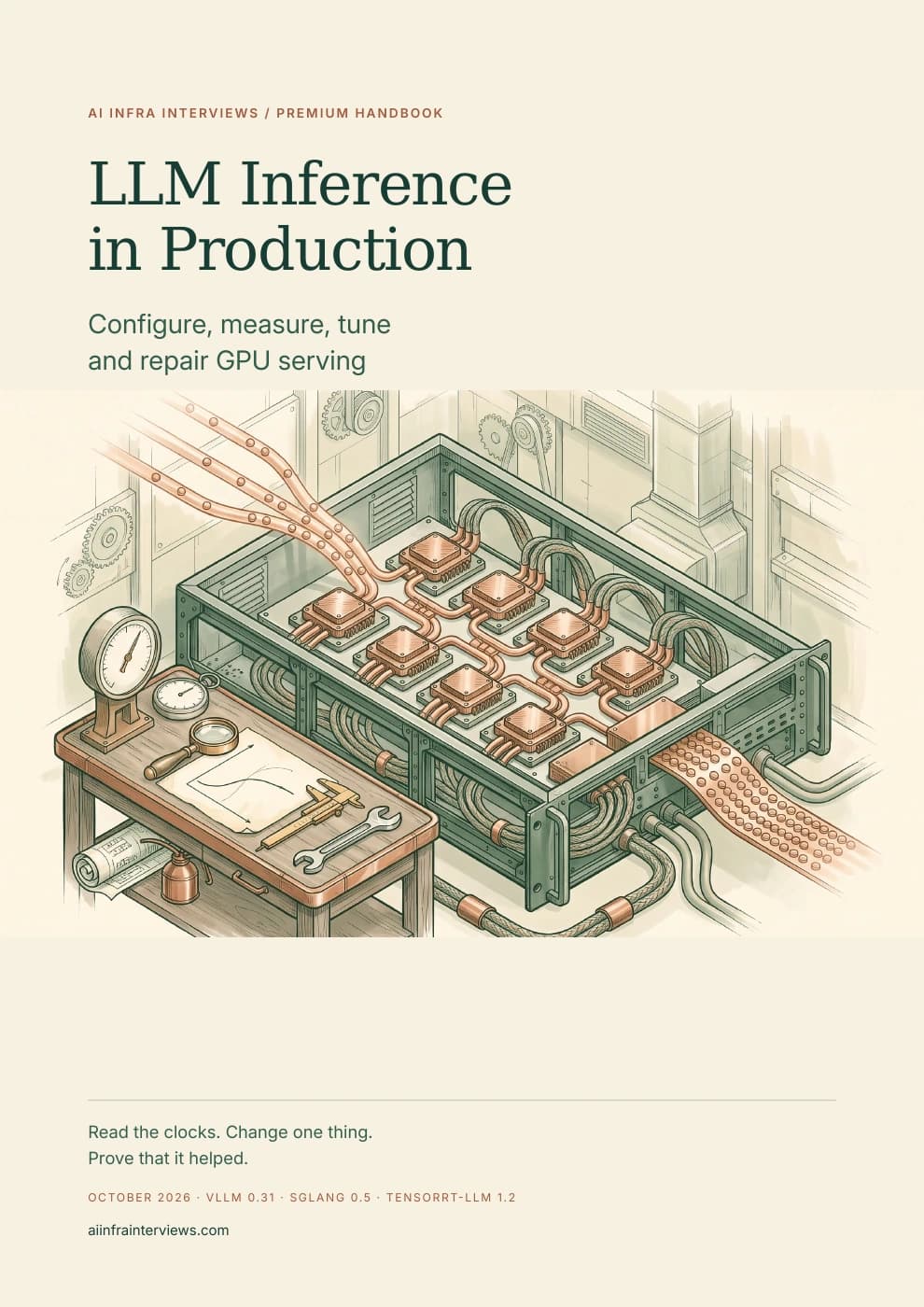
Configure, measure, tune and repair GPU serving
Starting an inference engine takes one command; running it well takes everything after. This handbook follows a production LLM service from its first request to its worst night: the clocks behind every latency number, the memory budget behind every out-of-memory error, the flags behind every default, and the evidence that proves a change helped.
Premium guide PDFs and companion files require an active paid Premium membership or approved complimentary access. Referral Premium includes the rest of the site, but excludes these downloads. Keep the copies you download.
Already a member? Sign in to download →
The 18 October update explains when a roofline estimate applies, how Nsight Compute replay and cache control affect a profile, and how to qualify a custom kernel before trusting its timing. The profiling chapter now connects numerical checks, work distribution, compiled baselines and repeated trials to a final service benchmark.
Practice that workflow in Qualify a Triton kernel or study GEMM Work Partitioning. Both require Premium. The model and engine review retains its 17 October source checks; the report does not present new serving measurements.
Inference engineering is the work of serving a trained model to users at a target latency, quality and cost. In production that means choosing and configuring a serving engine such as vLLM, SGLang or TensorRT-LLM, budgeting GPU memory between weights and the KV cache, selecting precision and kernels, benchmarking under realistic load, observing and scaling the service, and repairing it when hardware or software fails.
Most material stops at the design. This handbook starts from a running engine. Each chapter ties a concept to the flag that controls it, the default it replaces in a pinned engine version, the metric that shows its effect and the arithmetic that predicts it. The companion reproduces the memory and capacity calculations and analyzes synthetic service evidence.
ML platform and infrastructure engineers who run LLM serving, SREs who are taking on GPU services, and inference engineers preparing for production work or for interviews about it. You should be comfortable with a Linux shell and know what a GPU and a container are. The first part defines the serving terms the rest of the book relies on, so you can start there even if you have only launched an engine once.
It is the operating manual for the designs explained in the LLM Inference Systems Design Handbook, and it hands off to Distributed Inference on Kubernetes for cluster-wide routing and disaggregation. The two books link to each other rather than repeating material.
Name the clock that moved: queue, prefill, decode or the network. Account for every gigabyte of GPU memory and size the KV cache from a model's config.json, including latent and sliding-window attention.
Write vLLM, SGLang and TensorRT-LLM commands flag by flag, with the default each flag replaces, the hardware-dependent defaults that change on a new GPU, and the metric that shows whether the change worked.
Choose FP8, NVFP4, MXFP4 or INT4 weights and an FP8 or NVFP4 cache with an evaluation gate. Budget speculative decoding by measured acceptance and concurrency, and shorten startup with compile caches.
Run benchmarks with real lengths, arrival processes and goodput. Alert on the share of requests that missed an objective, trace one slow request across every hop and profile from the timeline to the kernel.
Autoscale on in-flight requests with the KEDA and HPA arithmetic done correctly, price a token from measured goodput and utilization, and roll out engine and model changes behind canaries.
Follow decision trees for out-of-memory errors, p99 regressions, Xid errors and failing GPUs, silent corruption and NCCL hangs. Capture an evidence bundle before restarting, then write a review that changes something.
The research for this edition checked every adopted claim against the engine source at a pinned release, vendor documentation or the original paper. Several widely repeated recommendations did not survive. A few examples, each explained with its evidence in the book:
These pages come from the complete Premium PDF. Enlarge them to see the layout, tables and diagrams; the expandable sections give the opening text of each sample as accessible HTML.
Inside the guide
Read these samples as text →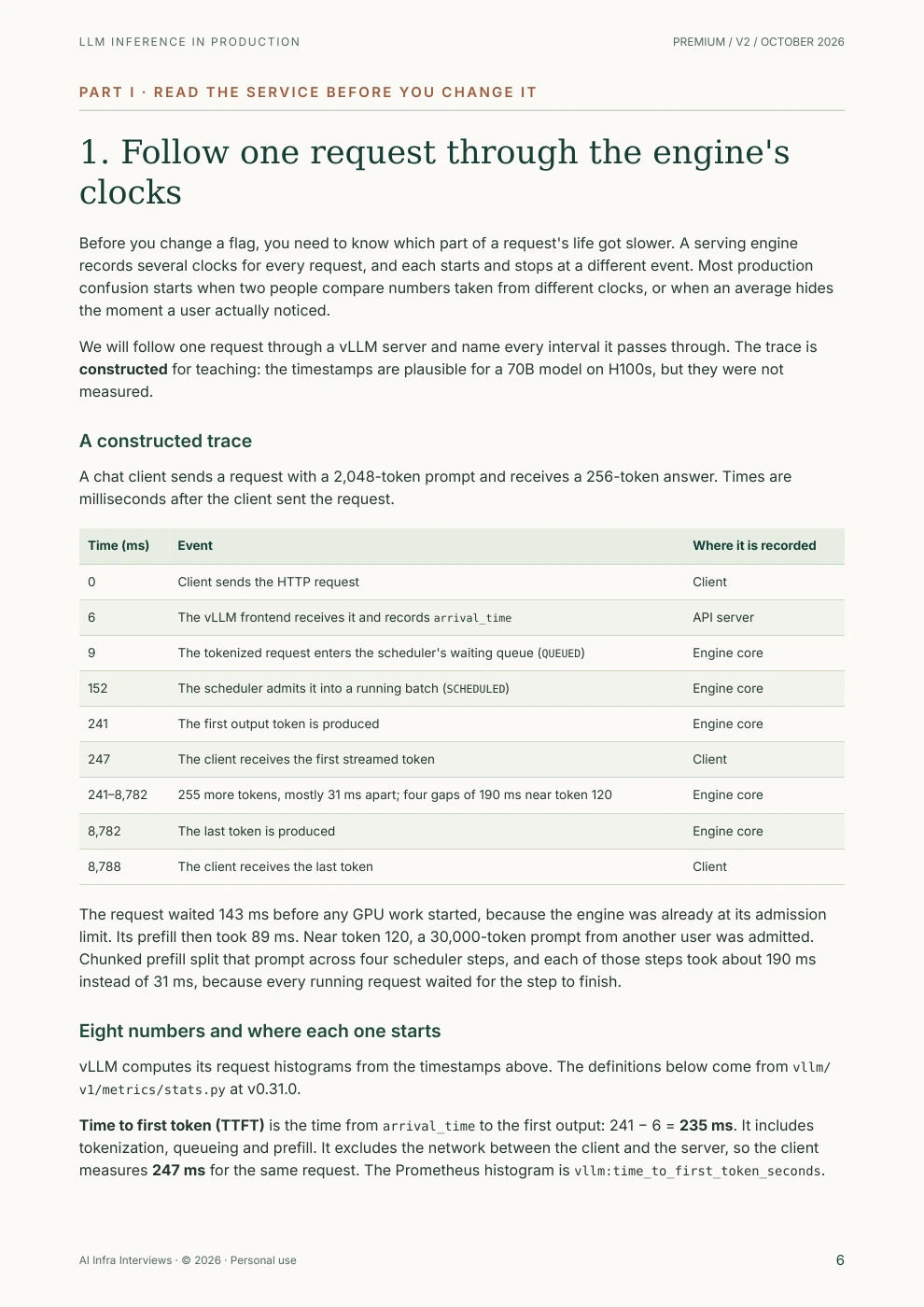
Before you change a flag, you need to know which part of a request's life got slower. A serving engine records several clocks for every request, and each starts and stops at a different event. Most production confusion starts when two people compare numbers taken from different clocks, or when an average hides the moment a user actually noticed.
We will follow one request through a vLLM server and name every interval it passes through. The trace is constructed for teaching: the timestamps are plausible for a 70B model on H100s, but they were not measured.
A chat client sends a request with a 2,048-token prompt and receives a 256-token answer. Times are milliseconds after the client sent the request.
| Time (ms) | Event | Where it is recorded |
|---|---|---|
| 0 | Client sends the HTTP request | Client |
| 6 | The vLLM frontend receives it and records arrival_time | API server |
| 9 | The tokenized request enters the scheduler's waiting queue (QUEUED) | Engine core |
| 152 | The scheduler admits it into a running batch (SCHEDULED) | Engine core |
| 241 | The first output token is produced | Engine core |
| 247 | The client receives the first streamed token | Client |
| 241–8,782 | 255 more tokens, mostly 31 ms apart; four gaps of 190 ms near token 120 | Engine core |
| 8,782 | The last token is produced | Engine core |
| 8,788 | The client receives the last token | Client |
The request waited 143 ms before any GPU work started, because the engine was already at its admission limit. Its prefill then took 89 ms. Near token 120, a 30,000-token prompt from another user was admitted. Chunked prefill split that prompt across four scheduler steps, and each of those steps took about 190 ms instead of 31 ms, because every running request waited for the step to finish.
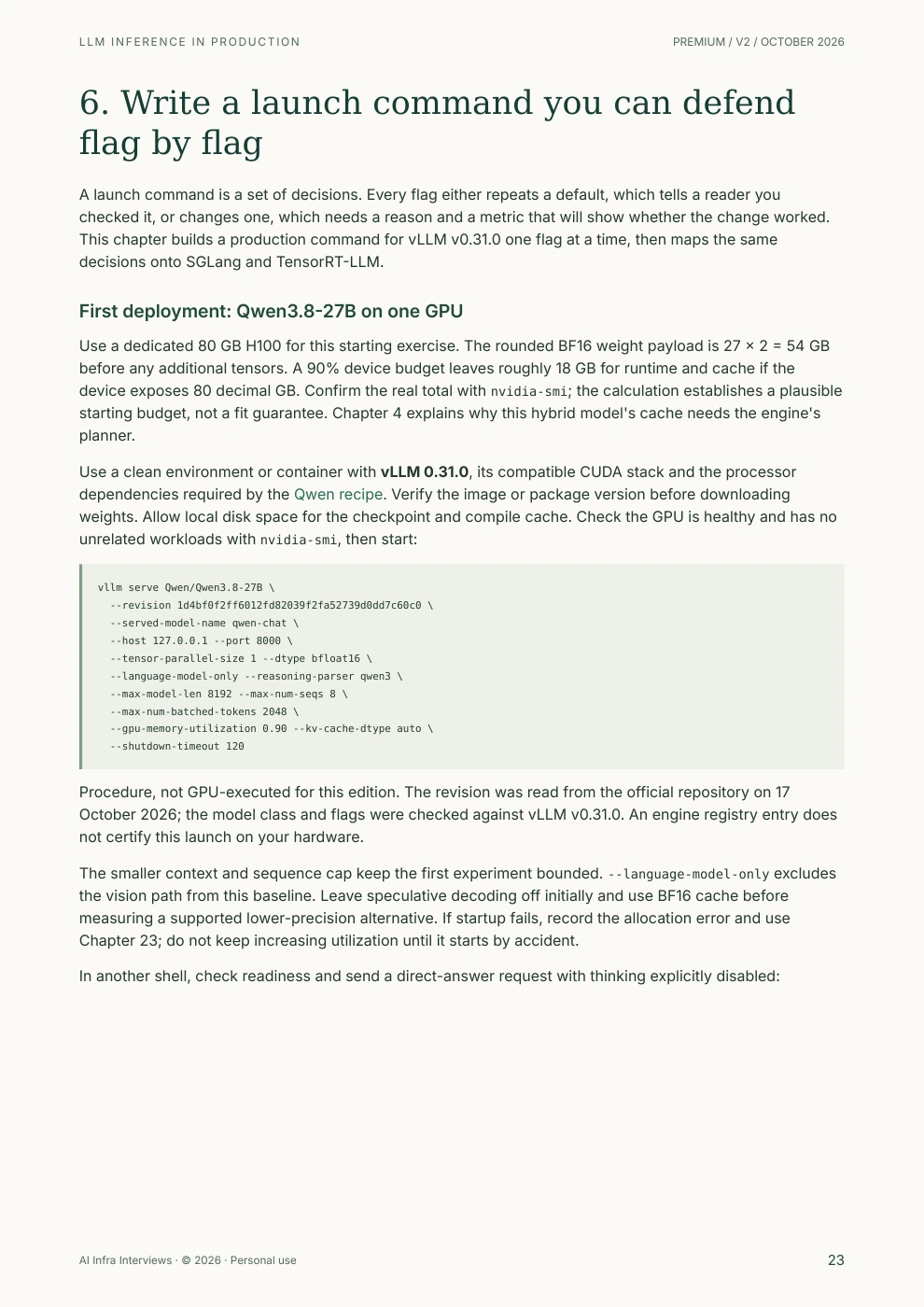
A launch command is a set of decisions. Every flag either repeats a default, which tells a reader you checked it, or changes one, which needs a reason and a metric that will show whether the change worked. This chapter builds a production command for vLLM v0.31.0 one flag at a time, then maps the same decisions onto SGLang and TensorRT-LLM.
Use a dedicated 80 GB H100 for this starting exercise. The rounded BF16 weight payload is 27 × 2 = 54 GB before any additional tensors. A 90% device budget leaves roughly 18 GB for runtime and cache if the device exposes 80 decimal GB. Confirm the real total with nvidia-smi; the calculation establishes a plausible starting budget, not a fit guarantee. Chapter 4 explains why this hybrid model's cache needs the engine's planner.
Use a clean environment or container with vLLM 0.31.0, its compatible CUDA stack and the processor dependencies required by the Qwen recipe. Verify the image or package version before downloading weights. Allow local disk space for the checkpoint and compile cache. Check the GPU is healthy and has no unrelated workloads with nvidia-smi, then start:
vllm serve Qwen/Qwen3.8-27B \
  --revision 1d4bf0f2ff6012fd82039f2fa52739d0dd7c60c0 \
  --served-model-name qwen-chat \
  --host 127.0.0.1 --port 8000 \
  --tensor-parallel-size 1 --dtype bfloat16 \
  --language-model-only --reasoning-parser qwen3 \
  --max-model-len 8192 --max-num-seqs 8 \
  --max-num-batched-tokens 2048 \
  --gpu-memory-utilization 0.90 --kv-cache-dtype auto \
  --shutdown-timeout 120
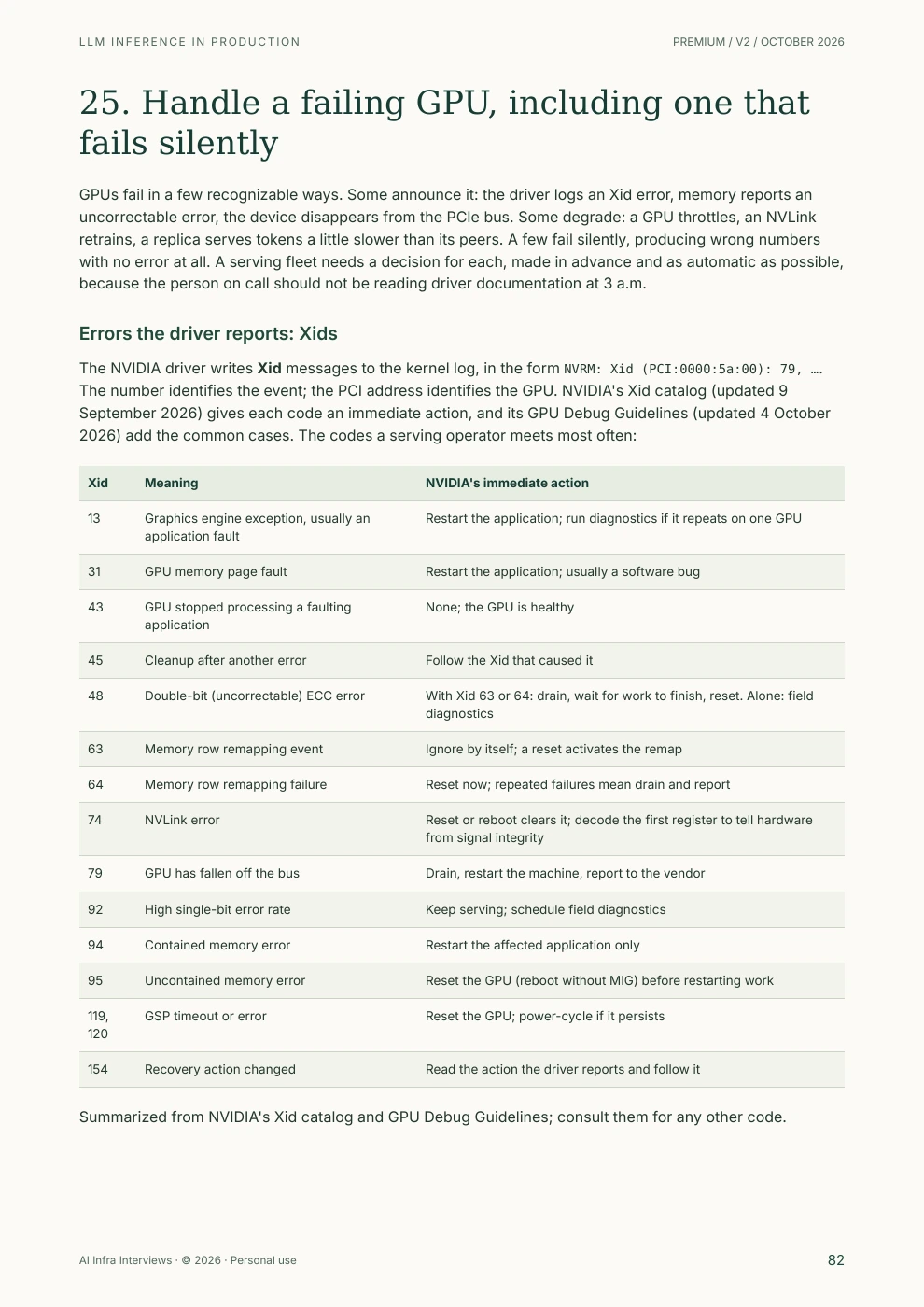
GPUs fail in a few recognizable ways. Some announce it: the driver logs an Xid error, memory reports an uncorrectable error, the device disappears from the PCIe bus. Some degrade: a GPU throttles, an NVLink retrains, a replica serves tokens a little slower than its peers. A few fail silently, producing wrong numbers with no error at all. A serving fleet needs a decision for each, made in advance and as automatic as possible, because the person on call should not be reading driver documentation at 3 a.m.
The NVIDIA driver writes Xid messages to the kernel log, in the form NVRM: Xid (PCI:0000:5a:00): 79, …. The number identifies the event; the PCI address identifies the GPU. NVIDIA's Xid catalog (updated 9 September 2026) gives each code an immediate action, and its GPU Debug Guidelines (updated 4 October 2026) add the common cases. The codes a serving operator meets most often:
| Xid | Meaning | NVIDIA's immediate action |
|---|---|---|
| 13 | Graphics engine exception, usually an application fault | Restart the application; run diagnostics if it repeats on one GPU |
| 31 | GPU memory page fault | Restart the application; usually a software bug |
| 43 | GPU stopped processing a faulting application | None; the GPU is healthy |
| 45 | Cleanup after another error | Follow the Xid that caused it |
| 48 | Double-bit (uncorrectable) ECC error | With Xid 63 or 64: drain, wait for work to finish, reset. Alone: field diagnostics |
| 63 | Memory row remapping event | Ignore by itself; a reset activates the remap |
| 64 | Memory row remapping failure | Reset now; repeated failures mean drain and report |
| 74 | NVLink error | Reset or reboot clears it; decode the first register to tell hardware from signal integrity |
| 79 | GPU has fallen off the bus | Drain, restart the machine, report to the vendor |
| 92 | High single-bit error rate | Keep serving; schedule field diagnostics |
| 94 | Contained memory error | Restart the affected application only |
| 95 | Uncontained memory error | Reset the GPU (reboot without MIG) before restarting work |
| 119, 120 | GSP timeout or error | Reset the GPU; power-cycle if it persists |
| 154 | Recovery action changed | Read the action the driver reports and follow it |
Summarized from NVIDIA's Xid catalog and GPU Debug Guidelines; consult them for any other code.
Xid 154 is the driver's own summary of what the other errors require. Its message reads like GPU recovery action changed from 0x0 (None) to 0x2 (Node Reboot Required), with possible actions of None, Drain P2P, Drain and Reset, GPU Reset Required and Node Reboot Required. When it appears, act on it rather than inferring the action from the other codes.
The table does not support the shortcut of draining a node for every memory-related Xid. Xid 63 alone needs no action; Xid 94 needs only one application restarted. Draining too eagerly loses capacity for nothing, and draining too little leaves a reset pending. The companion's xid.py reads log lines and prints the documented first action, which makes a useful step in a node-health script:
$ dmesg -T | grep -i xid | python3 xid.py
0000:5a:00  Xid 48   WORKFLOW_XID_48   With Xid 63 or 64: drain, wait for work to finish, reset the GPU. ...
0000:5a:00  Xid 63   IGNORE            Row remapper activity. Pair with 48 or 94 to decide; ...
0000:5a:00  Xid 154  XID_154           Read the reported action ... [driver reports: 0x2 (Node Reboot Required)]
0000:bb:00  Xid 79   RESTART_BM        Drain the node, restart the machine, collect a bug report for the vendor.
Excerpt from the companion's synthetic fixture. Unknown codes print as "look up", never as safe.
The PDF opens with a publication notice and a reading route, has linked contents and page numbers throughout, and closes with a reference chapter, frequently asked questions and the sources by chapter. These page numbers are from the current edition.
All three engines expose a memory fraction, and each applies it to something different. vLLM's --gpu-memory-utilization (0.92 by default in v0.31.0) is a share of total device memory for everything the instance uses. SGLang's --mem-fraction-static covers only the weights and the KV pool, so activations and CUDA graphs must fit outside it. TensorRT-LLM's --kv_cache_free_gpu_memory_fraction (0.9) applies to the memory still free after the weights load. Copying a number between engines changes the headroom, and that is one of the quieter causes of out-of-memory errors after a migration.
The handbook works the budget for a 70B model on eight H100s from the startup log to the concurrency it allows, shows what FP8 weights and an FP8 cache each change, and maps every launch decision between the three engines.
The practical route begins with Qwen3.8-27B on a high-memory GPU: a pinned checkpoint, a bounded text-only launch, a streamed request and a startup record. Follow that deployment through a load sweep, quality checks, telemetry, admission control, a graceful restart and a rollback rehearsal.
A model-selection section covers GLM-5.3-Flash, Kimi K3 and DeepSeek-V4.1-Flash using official model cards and engine recipes checked on 17 October 2026. It explains why active parameters do not determine resident memory, why hybrid caches need model-specific planning, and why a new API release is distinct from a local checkpoint revision. These are documented deployment paths to qualify on your equipment, not GPU benchmark results from this publication.
The measurement chapters use the clocks the engines actually record. vLLM's time to first token runs from the frontend's arrival time to the first output, so it includes queueing and prefill but not the network; its inter-token latency is recorded between output events, which changes meaning once speculative decoding emits several tokens at a time. Its latency histograms have fixed bucket edges, so an estimated p99 between 1 and 2.5 seconds is an interpolation. The book therefore alerts on the share of requests that missed an objective, with multi-window burn rates, and summarizes benchmarks with goodput and the worst individual stall alongside the percentiles.
The companion ZIP holds six small programs with 47 unit tests, using only the Python standard library. They calculate KV-cache size for supported reference configurations and reject unsupported hybrid layouts, compare engine memory budgets and decode floors, predict speculative decoding speedup and infer an acceptance parameter under a stated fixed-length model, simulate how the Kubernetes HPA reads a KEDA trigger, summarize vllm bench serve results with goodput and stalls, read two /metrics snapshots and classify Xid kernel messages. A read-only incident-bundle script and a postmortem template complete it.
Flag names, defaults and metric names read from the vLLM v0.31.0, SGLang v0.5.21 and TensorRT-LLM v1.2.1 source and documentation; hardware figures from vendor specifications, labeled dense or derived; research results quoted with their models, hardware and baselines; the companion's arithmetic and analysis, run against synthetic fixtures that are marked as such.
Serving benchmarks, profiler sessions, GPU resets, fabric tests and recovery procedures were not executed for this edition. Commands are documented procedures to qualify on your own hardware and versions. Request traces, log lines and metric snapshots in the book are constructed for teaching and labeled that way.
Version 2 · October 2026. Prepared with AI assistance and reviewed against primary sources. The Gemini (Nano Banana) cover is conceptual artwork; diagrams are original drawings.
The PDF lists 104 distinct source links by chapter. A few starting points:
For the concepts behind the operations, read Latency Metrics: TTFT, TPOT and Goodput, KV Cache Sizing and GPU Failure Modes and XID Errors. The Inference Engineering course works through the same decisions with drills, and the inference explainer shows prefill, the KV cache and decode on a real model in your browser.
Practice the interview versions with P99 latency spiked, P50 flat and vLLM OOMs at launch, or browse the inference serving questions. Each resource shows its own access requirements.
Inference engineering is the work of serving a trained model to users at a target latency, quality and cost. It covers choosing and configuring a serving engine, budgeting GPU memory and the KV cache, selecting precision and kernels, benchmarking under realistic load, observing the service, scaling it and repairing it when hardware or software fails.
The systems design handbook explains how a serving system works and how to design one, from a single GPU to a fleet. This guide is its operating manual. It includes a first Qwen3.8-27B deployment, then covers the flags, defaults, metrics, alerts, profiles and runbooks used to operate and recover a service. The two books link to each other instead of repeating material.
The examples are pinned to vLLM v0.31.0 and SGLang v0.5.21, with TensorRT-LLM v1.2.1, NVIDIA Dynamo v1.5.1 and llm-d v0.10.0 where they apply. Defaults were read from each project's source or documentation at those versions in October 2026. Flags change between releases, so the book shows how to confirm a value with --help and the startup log before you rely on it.
Yes. The October 2026 revision starts the practical deployment path with Qwen3.8-27B and compares production requirements for GLM-5.3-Flash, Kimi K3 and DeepSeek-V4.1-Flash using official sources. Older Llama, Qwen and DeepSeek examples remain where they make the memory arithmetic easy to verify. The newer model paths explain hybrid cache limits, reasoning and parser settings, engine prerequisites and the checks required before a production rollout.
No. It contains derived ceilings, worked arithmetic with stated assumptions and documented procedures. GPU benchmarks, profiler sessions and hardware recovery steps were not executed for this edition and are labeled that way. The companion's analysis tools were tested on a CPU against synthetic files that are marked as synthetic.
No. The Python companion uses only the standard library. It calculates KV payload for supported reference configurations and rejects unsupported hybrid architectures, compares engine memory settings, predicts speculative decoding speedup, simulates how an autoscaler reads a trigger, summarizes a saved vllm bench serve result, reads two /metrics snapshots and maps Xid log lines to NVIDIA's documented first action.
The utilization gauge reports whether a kernel was running during the sample, not how much of the GPU's compute or bandwidth was in use. A decode-heavy engine can report high utilization while it still has room for more requests, or while requests queue behind a full KV cache. Queue depth and KV-cache usage help explain the bottleneck; a load test establishes how much capacity remains within the latency objective.
Engineers who run or are about to run LLM serving: ML platform and infrastructure engineers, SREs taking on GPU services and inference engineers preparing for production or for interviews about it. You should be comfortable with a Linux shell and know what a GPU and a container are. Earlier chapters define the serving terms the later chapters rely on.
The contents, selected sample pages and overview are public. The complete PDF and the Python companion require active paid Premium membership or approved complimentary access. Referral Premium does not include paid guide downloads.
Download the PDF and the tested companion. Use the launch-command maps, memory and capacity arithmetic, alert rules, profiling procedures and repair runbooks to run an LLM service you can explain, measure and fix.
Premium guide PDFs and companion files require an active paid Premium membership or approved complimentary access. Referral Premium includes the rest of the site, but excludes these downloads. See the Terms for the personal, non-transferable license. Share this public page; please do not redistribute the complete PDF. Report a correction with the edition and page number.