
Recognize what you are connecting
Identify cages, transceivers, DAC and AOC assemblies, LC and MPO connectors. Check polish, polarity, lane mapping, power and the approved parts list before fitting a cable.
Premium field guide / October 2026
NVLink, RDMA fabrics, cabling and enterprise security
Understand what connects to what, then prove that it works. Follow a tensor from GPU memory through NVLink, PCIe and a data-center fabric. Learn to identify the cables, size the topology, place the firewall and measure the workload.
Premium guide PDFs and companion files require an active paid Premium membership or approved complimentary access. Referral Premium includes the rest of the site, but excludes these downloads. Keep the copies you download.
Already a member? Sign in to download →

GPU networking moves tensors, model state and data between accelerators, servers and storage. Inside a supported system, GPUs may communicate through NVLink and NVSwitch or through PCIe. Between systems, adapters connect to an InfiniBand or Ethernet fabric. Management, storage and user-facing traffic have their own capacity and security requirements.
The guide connects these layers. It explains why a link LED, a successful ping and a good all-reduce benchmark establish different facts. You will learn to ask which memory the transfer uses, which physical path it takes, which software selects it and which control governs access.
AI engineers moving from one GPU to distributed workloads, infrastructure engineers planning a GPU cluster, and enterprise platform teams responsible for secure deployment. Basic Linux familiarity is enough to begin. The hardware atlas introduces unfamiliar connectors before the wiring procedures use them.
Start with the two-node pilot when the equipment is new to you. Use the 1,024-GPU example for capacity planning, or go directly to the security and commissioning chapters when reviewing an existing design. This edition focuses its hardware procedures on NVIDIA platforms; it explains which planning principles carry over to other accelerators and provider-managed cloud networks.
Identify cages, transceivers, DAC and AOC assemblies, LC and MPO connectors. Check polish, polarity, lane mapping, power and the approved parts list before fitting a cable.
Separate PCIe, NVLink, NVSwitch and the scale-out network. Read H100, H200, B200, B300 and GB200/GB300 NVL72 platform requirements without treating a GPU name as a wiring specification.
Work through InfiniBand and RoCEv2, rail alignment, leaf–spine topology, oversubscription and dual planes. Reproduce a complete 1,024-GPU logical port budget.
Trace VLANs, VRFs, InfiniBand partitions and firewall boundaries. Build a directional flow matrix and test the actual RDMA path between tenants.
Move from local GPU checks to host-memory RDMA, GPU-memory RDMA, NCCL collectives and the real application. Interpret bandwidth conventions, congestion signals and failures.
Connect workload demand to optics, storage, recovery and support. Use the companion calculator and worksheets to make assumptions and acceptance criteria visible.
OSFP and QSFP describe module form factors. LC and MPO describe fiber connectors. DAC and AOC describe cable assemblies. InfiniBand and Ethernet describe communication technologies. Keeping those names separate makes the connection plan much easier to understand.
The book includes 4 credited hardware photographs, original assembly drawings and links to official port maps and modern component illustrations. It walks through server rear panels, firewall appliances, switch port and service sides, compute adapters, breakout branches and endpoint labels. The photos identify component families; their captions clearly mark legacy parts and explain their identification purpose.
Compatibility checks include the exact equipment and firmware, electrical lanes, optical standard, fiber type, connector polish, polarity, reach and cooling. Manufacturer documentation remains authoritative for the part you buy. No image comes from the publisher’s private infrastructure.
These selected pages come from the complete Premium PDF. Enlarge them to inspect the layout and diagrams. The expandable excerpts provide the opening text of each sample in accessible HTML.
Inside the guide
Read these samples as text →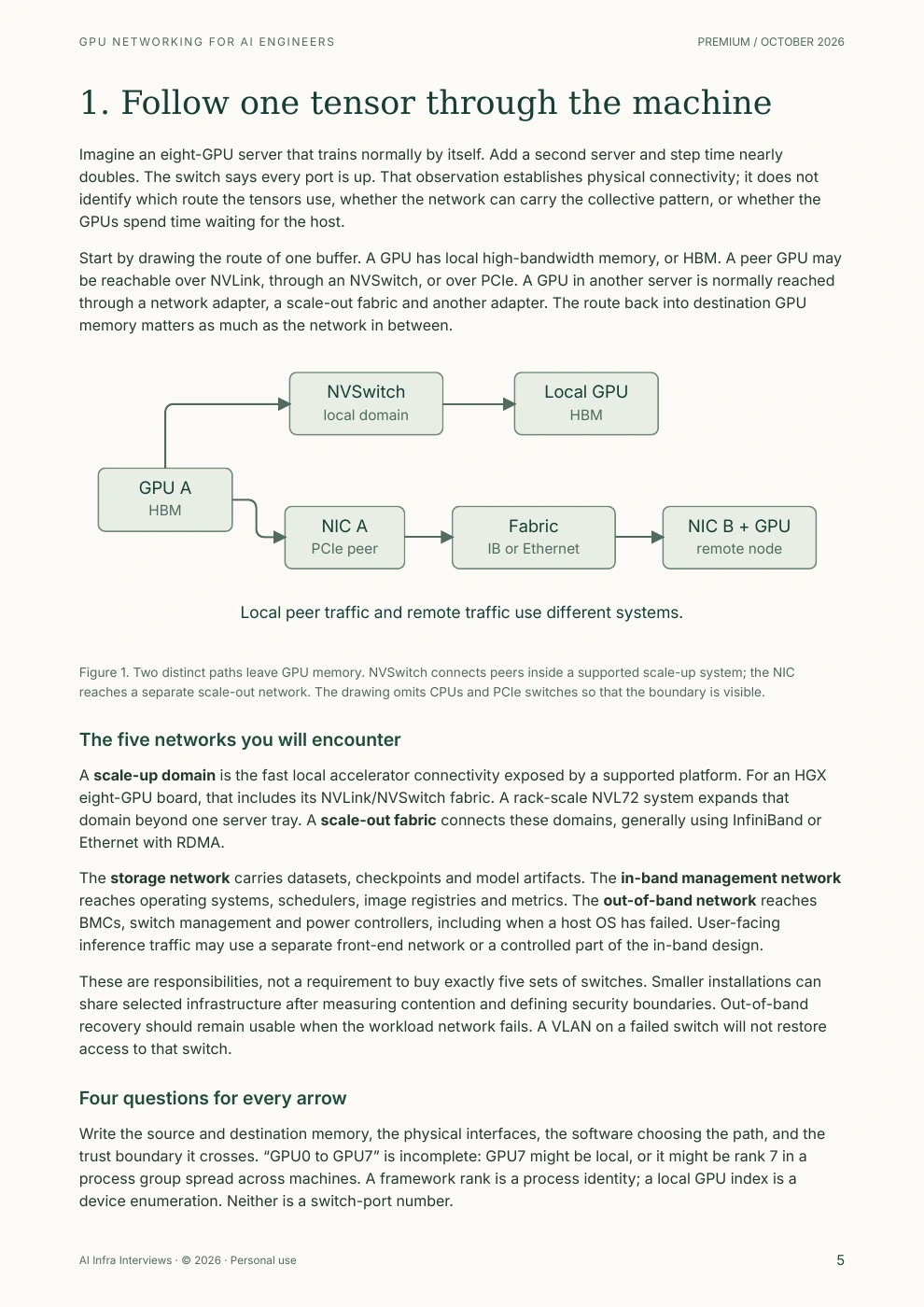
Imagine an eight-GPU server that trains normally by itself. Add a second server and step time nearly doubles. The switch says every port is up. That observation establishes physical connectivity; it does not identify which route the tensors use, whether the network can carry the collective pattern, or whether the GPUs spend time waiting for the host.
Start by drawing the route of one buffer. A GPU has local high-bandwidth memory, or HBM. A peer GPU may be reachable over NVLink, through an NVSwitch, or over PCIe. A GPU in another server is normally reached through a network adapter, a scale-out fabric and another adapter. The route back into destination GPU memory matters as much as the network in between.
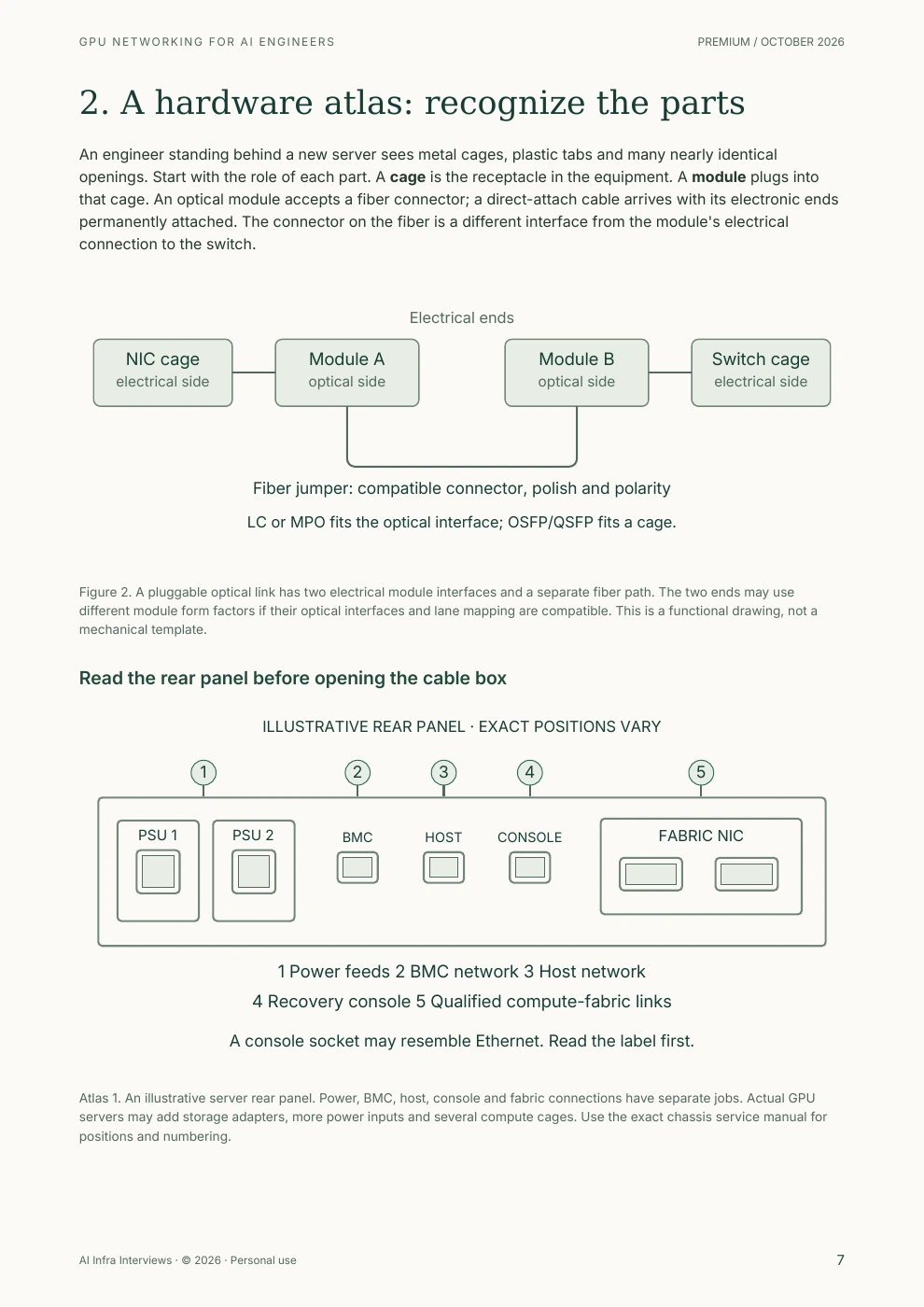
An engineer standing behind a new server sees metal cages, plastic tabs and many nearly identical openings. Start with the role of each part. A cage is the receptacle in the equipment. A module plugs into that cage. An optical module accepts a fiber connector; a direct-attach cable arrives with its electronic ends permanently attached. The connector on the fiber is a different interface from the module's electrical connection to the switch.
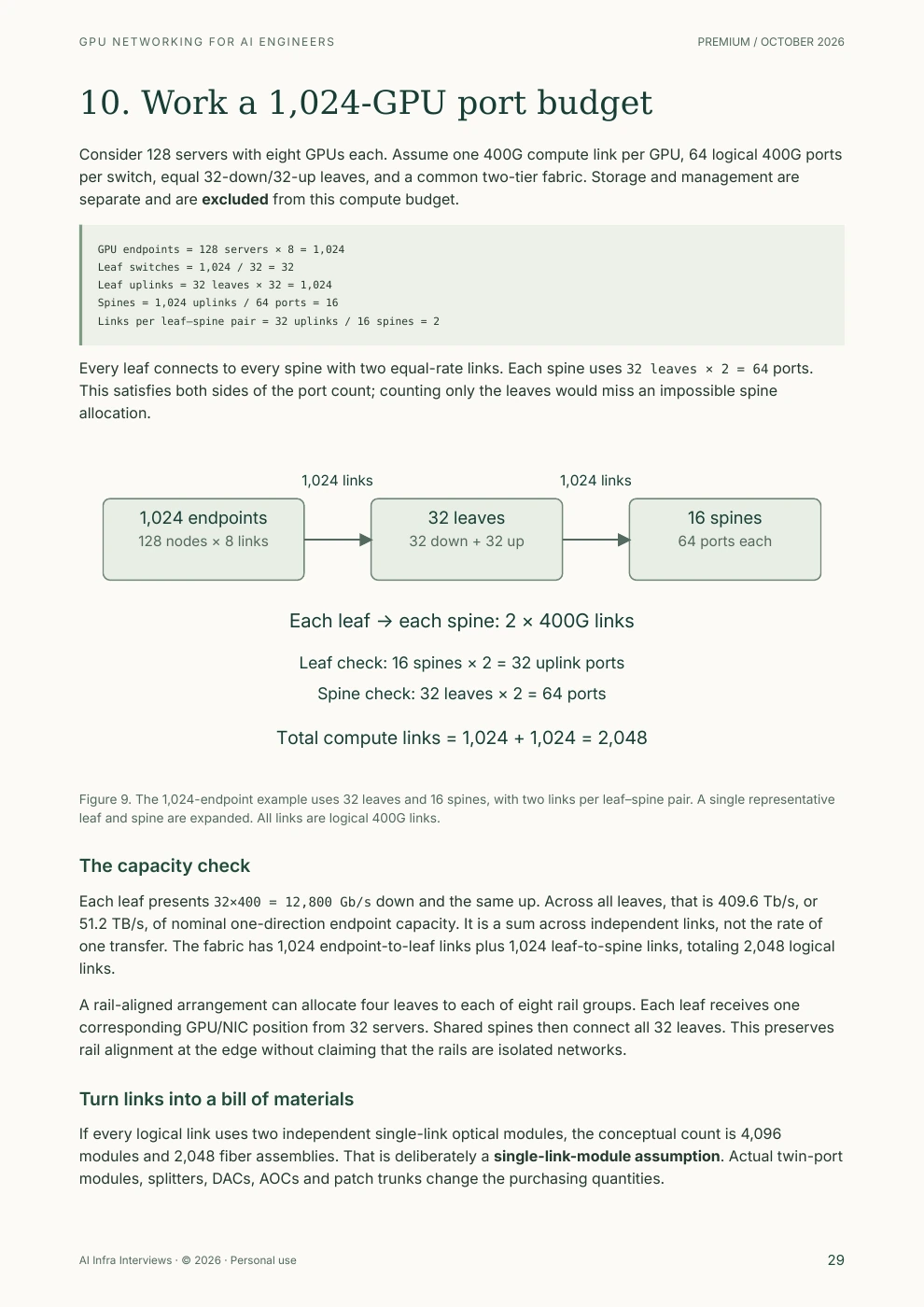
Consider 128 servers with eight GPUs each. Assume one 400G compute link per GPU, 64 logical 400G ports per switch, equal 32-down/32-up leaves, and a common two-tier fabric. Storage and management are separate and are excluded from this compute budget.
GPU endpoints = 128 servers × 8 = 1,024
Leaf switches = 1,024 / 32 = 32
Leaf uplinks = 32 leaves × 32 = 1,024
Spines = 1,024 uplinks / 64 ports = 16
Links per leaf–spine pair = 32 uplinks / 16 spines = 2
Every leaf connects to every spine with two equal-rate links. Each spine uses 32 leaves × 2 = 64 ports. This satisfies both sides of the port count; counting only the leaves would miss an impossible spine allocation.
The PDF includes a publication and use notice, a reading route, clickable contents, page numbers, image credits and a primary-source reference index. These page numbers come from the current edition.
NVLink and NVSwitch form supported scale-up systems. InfiniBand and RoCE connect network adapters across a scale-out fabric. A rack-scale NVL72 system expands the NVLink domain, while still needing external networking for other domains, storage and operations. An ordinary network transceiver cannot replace the platform’s internal NVLink cable system.
The platform chapter distinguishes H100/H200 variants, HGX and DGX systems, B200/B300 eight-GPU platforms and GB200/GB300 NVL72 racks. It also corrects a common purchasing shortcut: NVIDIA’s DGX B200 specification uses ConnectX-7 400G compute connections. The GPU generation alone does not establish an 800G network requirement. Official DGX B200 inventory →
The transport comparison considers congestion control, software qualification, operating experience and recovery. It gives you a method for choosing InfiniBand or RoCE without declaring a universal winner.
A VLAN separates Ethernet broadcast domains; a VRF separates routing tables; an InfiniBand partition controls fabric membership. None of those mechanisms encrypts a tensor. The book explains how these controls work alongside authenticated access, device ownership and tested traffic policy.
A firewall must lie on the path it is meant to inspect. Same-subnet traffic, local inter-VLAN routing and passed-through RDMA devices can take different paths. The guide supplies a physical placement walkthrough, example address plan and directional flow matrix for management, Kubernetes, Slurm and infrastructure services.
It compares the roles of OPNsense, pfSense, commercial firewalls, Suricata, Zeek and qualified fabric or DPU controls. The selection question is what the product can enforce and observe in the actual design, including its enabled-policy capacity and failure behavior.
Derive a 1,024-GPU port budget, normalize bits versus bytes and one-way versus bidirectional bandwidth, estimate collective communication, and calculate KV-cache transfer and storage bursts. Every example states its assumptions. Logical links, physical cages, optical modules and cable assemblies are counted separately.
The companion ZIP contains a Python capacity calculator, a symbolic cable-map generator and editable inventory, flow-policy, acceptance and incident worksheets. It runs locally with Python 3.10 or newer and no third-party packages. It does not configure equipment or scan a network.
Primary documentation, worked arithmetic and the companion’s capacity and duplicate-port checks. The book separates theoretical ceilings, illustrative cases and procedures that need hardware. Licensed photos retain their source credits and reuse terms.
GPU transfers, RDMA and NCCL benchmarks, optical margins, congestion behavior, firewall enforcement and failure recovery. No hardware benchmark or vendor certification is claimed. Follow the exact platform support matrix and your change procedure.
October 2026 edition. Prepared with AI assistance. The Gemini/Nano Banana cover is conceptual artwork; technical diagrams are original explanatory drawings. All example names and addresses are invented.
The PDF links 46 distinct technical reference URLs beside the relevant decisions and gathers them in an index. These are useful starting points for checking your intended platform:
Design recommendations are engineering synthesis from the cited sources. A feature announcement or component specification does not certify the complete deployment.
Use RDMA, InfiniBand and RoCEv2, Rail-Optimized and Fat-Tree Fabrics and NCCL and Collective Algorithms for focused explanations. The Training at Scale course connects the network to model placement and distributed execution.
The Proxmox GPU Server Guide covers virtualization and host management; Distributed Inference on Kubernetes follows serving across a fleet. Practice the decisions in the networking interview questions. Each resource shows its own access requirements.
GPU networking moves tensors, model state and data between accelerators, servers and storage. It includes local PCIe and NVLink paths, scale-out InfiniBand or Ethernet fabrics, and the management and security networks needed to operate them.
The server model and workload determine the requirement. NVIDIA's DGX B200 specification uses eight ConnectX-7 400 G compute connections. Other Blackwell platforms have different adapters and designs. Check the server port map, PCIe topology and qualified network architecture before buying cables or switches.
No. NVLink connects supported GPUs within a specified scale-up system. InfiniBand connects network adapters through a separate scale-out fabric. An NVL72 rack extends the NVLink domain across its compute trays; ordinary Ethernet or InfiniBand optics cannot substitute for its internal cable system.
OSFP and QSFP112 describe pluggable module form factors. MPO and LC describe fiber connectors on the optical side. The module, cable, connector polish, fiber type, lane mapping, protocol and speed must all match. A physically compatible plug is only one part of the check.
Put routed access boundaries for users, management, storage and external services under explicit policy. Keep the collective fabric inside a separately controlled compute boundary unless a qualified inspection design meets its transport and capacity requirements. Test RDMA isolation at the hardware path; a host firewall or Kubernetes NetworkPolicy alone may not cover it.
Both can support high-performance RDMA. Choose using the workload, qualified hardware and software stack, congestion behavior, isolation requirements and the team's operational experience. Compare application performance and recovery on the proposed topology rather than isolated link-rate specifications.
No. It includes derived capacity examples, a CPU-tested planning companion, documented hardware procedures and acceptance worksheets. Hardware benchmark commands are clearly labeled as not executed for this edition; readers must validate them on their intended equipment.
The contents, selected sample pages and overview are public. The complete PDF and companion worksheets require active paid Premium membership or approved complimentary access. Referral Premium does not include paid guide downloads.
Download the illustrated PDF and planning companion. Use the wiring walkthroughs, calculations, security matrix and commissioning method to turn a proposed GPU network into a design someone else can review and test.
Premium guide PDFs and companion files require an active paid Premium membership or approved complimentary access. Referral Premium includes the rest of the site, but excludes these downloads. See the Terms for the personal, non-transferable license. The credited third-party photos retain their own licenses. Share this public page; please do not redistribute the complete PDF. Report a correction with the edition and page number.