
Install with a recovery path
Inventory boot disks and network ports, verify the installer, establish management access, and build an ordinary Linux VM before adding GPU assignment.
Premium field guide / October 2026
B200, PCIe passthrough and enterprise firewalls
Build a GPU host you can administer, isolate and recover. Follow the Proxmox VE installation workflow, understand which layer owns the GPU, and plan the network boundaries before putting an inference service into production.
Premium guide PDFs and companion files require an active paid Premium membership or approved complimentary access. Referral Premium includes the rest of the site, but excludes these downloads. Keep the copies you download.
Already a member? Sign in to download →

Infrastructure engineers, platform teams and administrators who are considering Proxmox for GPU development or inference workloads. It assumes basic Linux administration and familiarity with IP addresses and subnets. You can rehearse the installer and VM workflow in a nested lab; physical device assignment and fabric validation need the intended server.
If you are choosing a B200 system, start with the qualification section. If you already operate a conventional PCIe GPU server, follow the ownership model through guest verification and firewall testing. The reading routes make those starting points explicit.
Inventory boot disks and network ports, verify the installer, establish management access, and build an ordinary Linux VM before adding GPU assignment.
Separate whole-device passthrough, NVIDIA vGPU, MIG and containers. Record which layer owns the driver and which support matrix applies.
Ask for an exact supported HGX or DGX configuration, including fabric services and device ownership, before replacing the vendor's host image.
Plan the management, BMC, gateway, workload and backup paths. Test denied connections as well as allowed ones, including IPv6 and traffic that bypasses the virtual bridge.
Distinguish a VM disk backup from a recoverable GPU service. Account for keys, model artifacts, external data, replacement devices and restart capacity.
Evaluate Proxmox alongside bare metal, KVM/libvirt, VMware, Nutanix, XCP-ng, OpenStack and Hyper-V, with security tooling matched to an operational need.
Proxmox combines KVM virtual machines, Linux containers, storage integration, permissions and a management interface. Separate guest operating systems can make driver experiments, development environments and service rebuilds easier to manage. Templates and scoped permissions help a team repeat that workflow.
The benefit has a hardware limit: assigning one physical GPU exclusively to one VM leaves it unavailable to another VM. Virtualization also adds a support combination to qualify, and a passed-through GPU changes maintenance and recovery options. For a workload that needs an entire NVSwitch node, the vendor-supported bare-metal stack may be the more practical choice.
The guide works through those tradeoffs before the installation steps, including subscriptions, support, spare capacity and operator time. It does not assign an invented percentage to virtualization overhead. Proxmox product and installation overview →
These are selected pages from the Premium PDF. Enlarge a page to inspect the typography and illustrations, or open its text version below.
Inside the guide
Read these samples as text →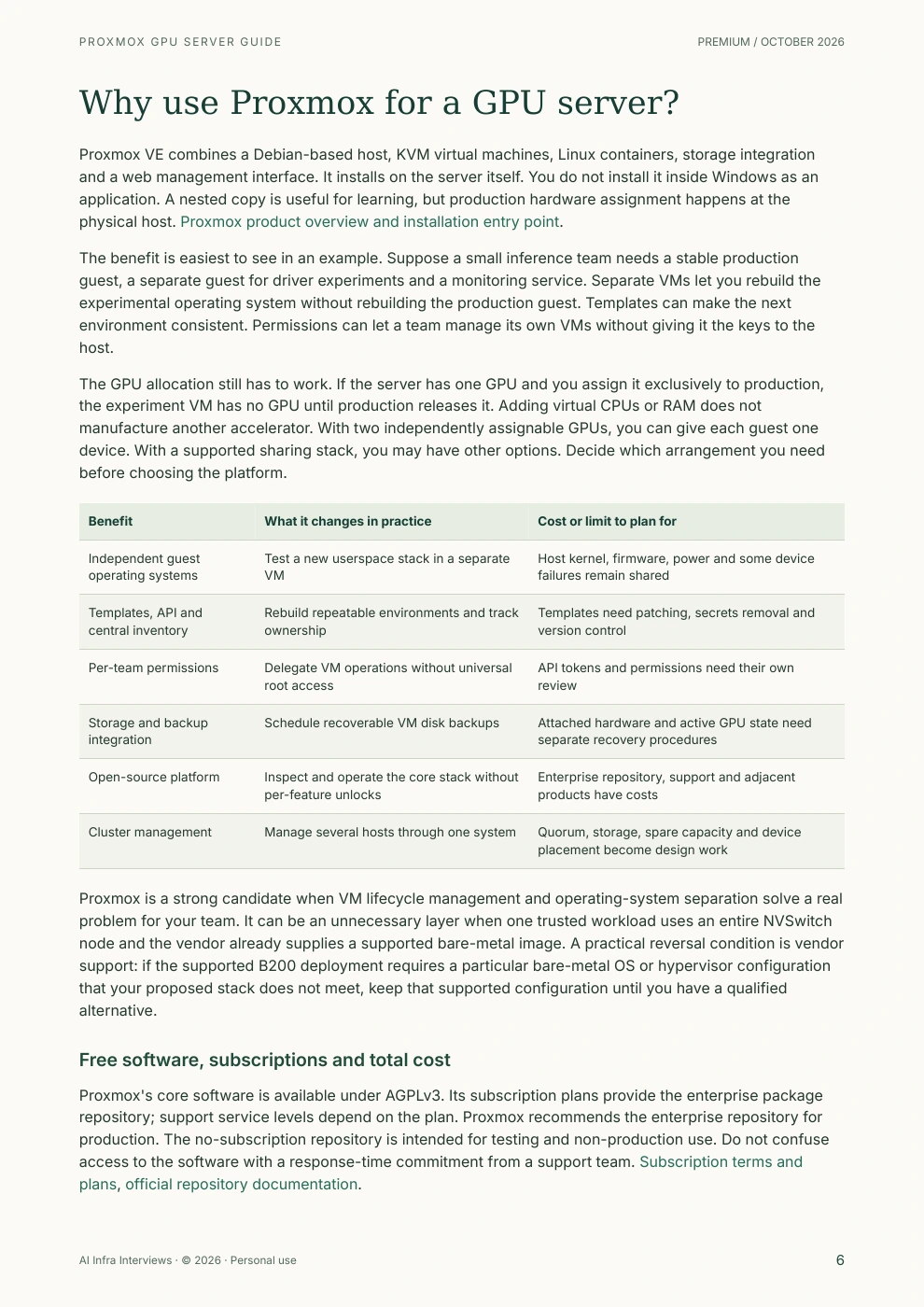
Proxmox VE combines a Debian-based host, KVM virtual machines, Linux containers, storage integration and a web management interface. It installs on the server itself. You do not install it inside Windows as an application. A nested copy is useful for learning, but production hardware assignment happens at the physical host. Proxmox product overview and installation entry point.
The benefit is easiest to see in an example. Suppose a small inference team needs a stable production guest, a separate guest for driver experiments and a monitoring service. Separate VMs let you rebuild the experimental operating system without rebuilding the production guest. Templates can make the next environment consistent. Permissions can let a team manage its own VMs without giving it the keys to the host.
The GPU allocation still has to work. If the server has one GPU and you assign it exclusively to production, the experiment VM has no GPU until production releases it. Adding virtual CPUs or RAM does not manufacture another accelerator. With two independently assignable GPUs, you can give each guest one device. With a supported sharing stack, you may have other options. Decide which arrangement you need before choosing the platform.
| Benefit | What it changes in practice | Cost or limit to plan for |
|---|---|---|
| Independent guest operating systems | Test a new userspace stack in a separate VM | Host kernel, firmware, power and some device failures remain shared |
| Templates, API and central inventory | Rebuild repeatable environments and track ownership | Templates need patching, secrets removal and version control |
| Per-team permissions | Delegate VM operations without universal root access | API tokens and permissions need their own review |
| Storage and backup integration | Schedule recoverable VM disk backups | Attached hardware and active GPU state need separate recovery procedures |
| Open-source platform | Inspect and operate the core stack without per-feature unlocks | Enterprise repository, support and adjacent products have costs |
| Cluster management | Manage several hosts through one system | Quorum, storage, spare capacity and device placement become design work |
Proxmox is a strong candidate when VM lifecycle management and operating-system separation solve a real problem for your team. It can be an unnecessary layer when one trusted workload uses an entire NVSwitch node and the vendor already supplies a supported bare-metal image. A practical reversal condition is vendor support: if the supported B200 deployment requires a particular bare-metal OS or hypervisor configuration that your proposed stack does not meet, keep that supported configuration until you have a qualified alternative.
Proxmox's core software is available under AGPLv3. Its subscription plans provide the enterprise package repository; support service levels depend on the plan. Proxmox recommends the enterprise repository for production. The no-subscription repository is intended for testing and non-production use. Do not confuse access to the software with a response-time commitment from a support team. Subscription terms and plans, official repository documentation.
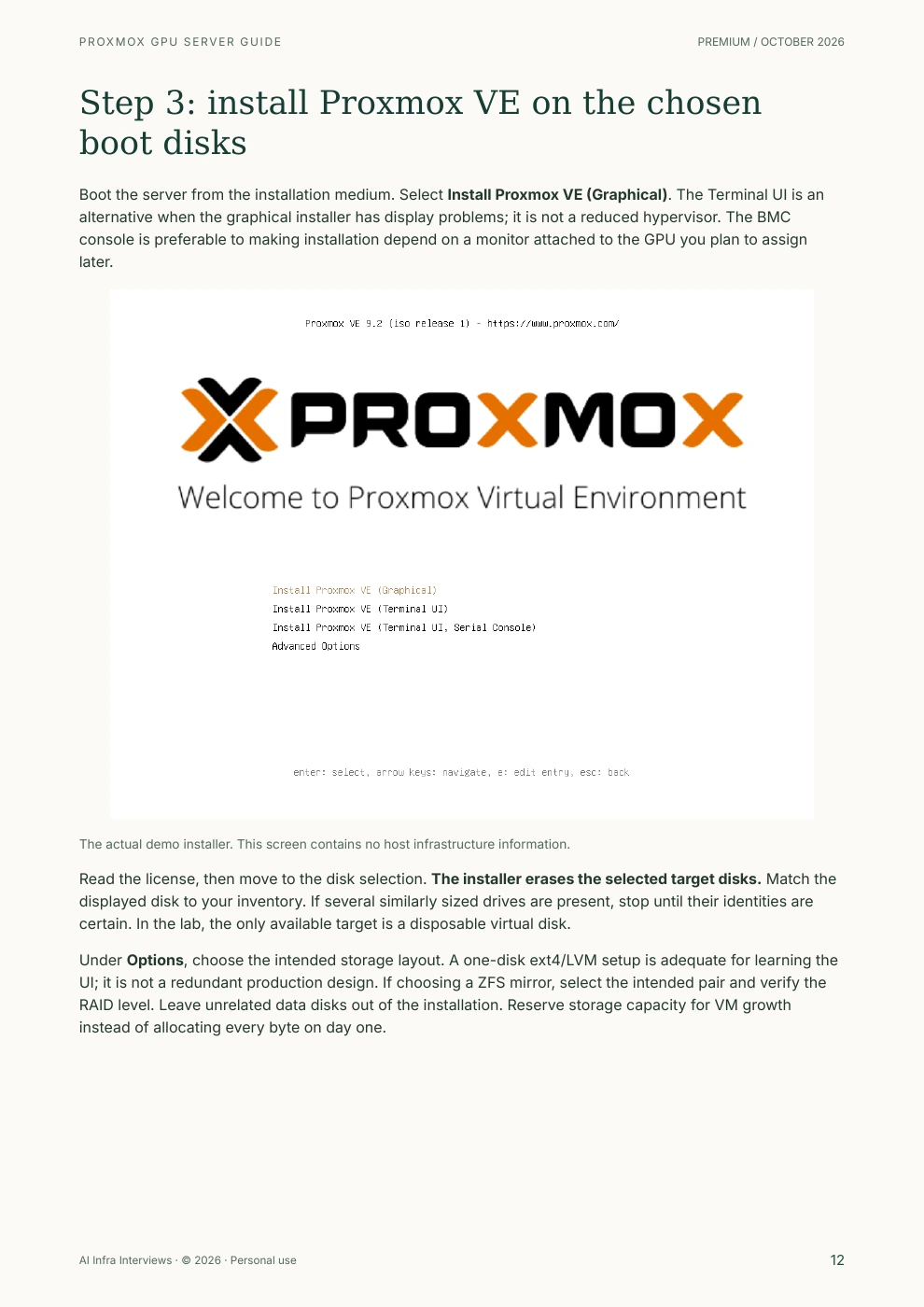
Boot the server from the installation medium. Select Install Proxmox VE (Graphical). The Terminal UI is an alternative when the graphical installer has display problems; it is not a reduced hypervisor. The BMC console is preferable to making installation depend on a monitor attached to the GPU you plan to assign later.
Screenshot: Proxmox VE 9.2 installer boot menu in an isolated demonstration VM.
The actual demo installer. This screen contains no host infrastructure information.
Read the license, then move to the disk selection. The installer erases the selected target disks. Match the displayed disk to your inventory. If several similarly sized drives are present, stop until their identities are certain. In the lab, the only available target is a disposable virtual disk.
Under Options, choose the intended storage layout. A one-disk ext4/LVM setup is adequate for learning the UI; it is not a redundant production design. If choosing a ZFS mirror, select the intended pair and verify the RAID level. Leave unrelated data disks out of the installation. Reserve storage capacity for VM growth instead of allocating every byte on day one.
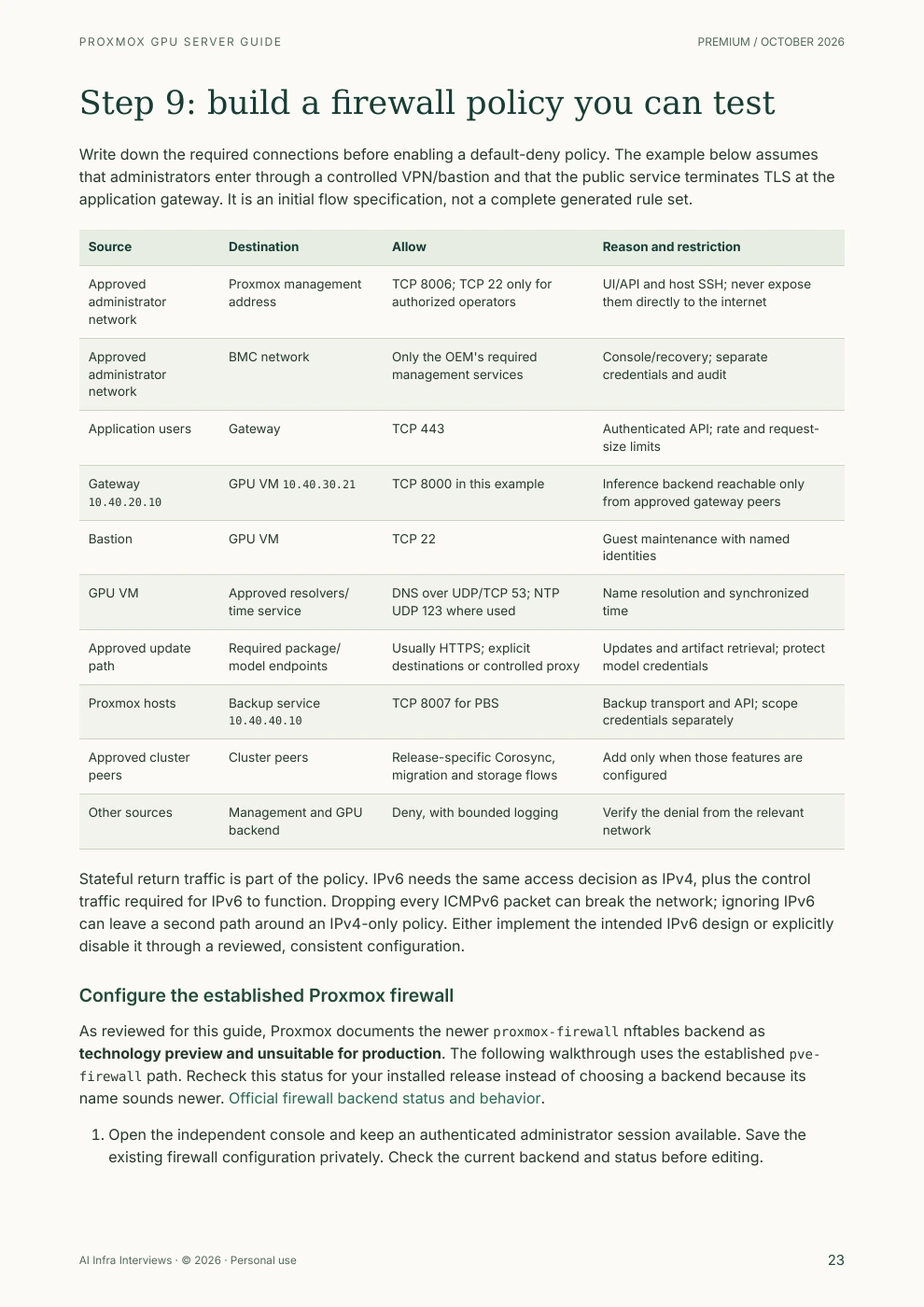
Write down the required connections before enabling a default-deny policy. The example below assumes that administrators enter through a controlled VPN/bastion and that the public service terminates TLS at the application gateway. It is an initial flow specification, not a complete generated rule set.
| Source | Destination | Allow | Reason and restriction |
|---|---|---|---|
| Approved administrator network | Proxmox management address | TCP 8006; TCP 22 only for authorized operators | UI/API and host SSH; never expose them directly to the internet |
| Approved administrator network | BMC network | Only the OEM's required management services | Console/recovery; separate credentials and audit |
| Application users | Gateway | TCP 443 | Authenticated API; rate and request-size limits |
Gateway 10.40.20.10 | GPU VM 10.40.30.21 | TCP 8000 in this example | Inference backend reachable only from approved gateway peers |
| Bastion | GPU VM | TCP 22 | Guest maintenance with named identities |
| GPU VM | Approved resolvers/time service | DNS over UDP/TCP 53; NTP UDP 123 where used | Name resolution and synchronized time |
| Approved update path | Required package/model endpoints | Usually HTTPS; explicit destinations or controlled proxy | Updates and artifact retrieval; protect model credentials |
| Proxmox hosts | Backup service 10.40.40.10 | TCP 8007 for PBS | Backup transport and API; scope credentials separately |
| Approved cluster peers | Cluster peers | Release-specific Corosync, migration and storage flows | Add only when those features are configured |
| Other sources | Management and GPU backend | Deny, with bounded logging | Verify the denial from the relevant network |
Stateful return traffic is part of the policy. IPv6 needs the same access decision as IPv4, plus the control traffic required for IPv6 to function. Dropping every ICMPv6 packet can break the network; ignoring IPv6 can leave a second path around an IPv4-only policy. Either implement the intended IPv6 design or explicitly disable it through a reviewed, consistent configuration.
As reviewed for this guide, Proxmox documents the newer proxmox-firewall nftables backend as technology preview and unsuitable for production. The following walkthrough uses the established pve-firewall path. Recheck this status for your installed release instead of choosing a backend because its name sounds newer. Official firewall backend status and behavior.
The PDF includes a publication notice, a reading map and clickable contents. The page numbers below correspond to the current edition.
An enterprise GPU host has several distinct traffic paths. Administrators need management access; users need an authenticated application endpoint; the GPU guest needs selected package, model and backup services. An upstream firewall, the Proxmox firewall and guest policies enforce different parts of that design.
The book provides an example network plan, a source-to-destination flow table, a staged policy procedure and recovery considerations. It compares OPNsense and pfSense with commercial firewall placements, then examines WireGuard, Tailscale, Wazuh, Security Onion, Microsoft Defender for Endpoint, Proxmox Backup Server and Veeam by the job each would do. Product support must be checked against the actual host or guest environment.
Two questions recur throughout: does this traffic actually cross the enforcement point, and can an administrator still recover the server when a guest is down? Those questions matter more than the number of security products installed.
The comparison covers bare-metal Linux, KVM/libvirt, OpenStack, VMware vSphere/VCF, Nutanix AHV, XCP-ng with Xen Orchestra and Microsoft Hyper-V. It separates VM management from workload scheduling: Kubernetes and Slurm can be part of the deployment without replacing every hypervisor function.
The suggested pilot compares workload correctness, useful throughput, permissions, maintenance interruption and restore behavior. Hardware qualification and the team's ability to operate the stack can reverse an initial platform preference. The guide explains those decision points without presenting a universal winner.
Official Proxmox VE 9.2-1 installation, management login, a stopped Linux VM configuration and a host-firewall test. The test path reached the interface before filtering and was denied afterward; the approved management path remained available.
PCIe GPU assignment and reset, CUDA workloads, B200 fabric and collective tests, enterprise VLANs, production restores and cluster failover. No GPU performance result or vendor certification is claimed for this edition.
Primary-source review: 13 October 2026. Six genuine screenshots use invented identifiers in a disposable VM. The Gemini/Nano Banana cover is conceptual artwork. No production host, account, address or serial appears in the screenshots.
The PDF links 46 distinct primary-source URLs beside the relevant decisions and collects them in a reference index. Start with these when checking your proposed release:
Recommendations and example architectures are engineering synthesis from these sources. A general platform listing does not certify every GPU, firmware, guest and fabric combination.
Use the GPU hardware reference while sizing a server, then practice the tradeoffs in hardware deployment questions. The infrastructure foundations course supplies the wider systems context.
The AI Infrastructure Field Guide connects hardware to inference and training. Self-Hosting Open-Weight Models follows the model into service, and Distributed Inference on Kubernetes extends the discussion to a fleet. Each resource shows its own access requirements.
The exact server and supported software configuration decide this. An HGX or DGX B200 deployment needs a qualified plan for NVSwitch fabric services, CX7 bridge functions, GPU assignment, firmware and guest drivers. The guide explains the questions to take to your OEM. A successful installation or a list of visible GPUs does not establish that the fabric works.
Yes. The walkthrough covers firmware checks, IOMMU groups, VFIO ownership, a Linux VM, guest drivers and a workload verification plan. The physical GPU steps must be validated on your hardware. They were not executed in the nested screenshot lab.
Proxmox VE is open-source software under AGPLv3, with subscriptions for the enterprise repository and support options. This is a separate Premium educational publication. Its contents and three sample pages are public; the complete PDF requires active paid Premium or approved complimentary access. Referral Premium does not include this download.
You need defined enforcement points for your traffic paths. The guide compares the host firewall, guest policies and an upstream firewall or VPN, including OPNsense, pfSense and commercial options. It explains why a firewall VM on the GPU host should not be the only way to reach that host during recovery.
No. They are genuine screenshots from a disposable nested demonstration with invented identifiers, isolated networking and no physical GPU. No publisher infrastructure, real BMC, customer account or hardware serial is exposed. The Gemini cover is conceptual artwork and is separate from the screenshots.
Yes. It includes a publication and use notice, numbered pages, clickable contents, linked primary sources, six demonstration screenshots and links to related learning resources. You may keep your downloaded copy for personal use under the site Terms. Share this public page rather than redistributing the PDF.
Download the illustrated PDF with the full walkthrough, source links, troubleshooting table and production acceptance worksheet. It uses the same personal-use terms and Premium access policy as the other paid guides.
Premium guide PDFs and companion files require an active paid Premium membership or approved complimentary access. Referral Premium includes the rest of the site, but excludes these downloads. See the Terms for the personal, non-transferable license. Share this public page; please do not redistribute the complete PDF. Report a correction with the edition and page number.